Apple Watch in Japan: Roaming, Suica and eSIM Limits Explained
Your Apple Watch probably won't get its own signal in Japan and can't take a travel eSIM, but Suica on your wrist still taps through gates offline.
On this page
Disclosure Some links on this page are affiliate links. If you buy through them we may earn a small commission at no extra cost to you. It never changes what we recommend.
This article contains affiliate links. We may earn a commission at no extra cost to you.
You walk out of arrivals at Haneda, glance at your wrist, and the little cellular dot on your Apple Watch stays grey. That's normal. In Japan your Watch will almost always run on your iPhone's connection, it can't hold a travel eSIM, and none of that stops Suica on your wrist from beeping you through the ticket gates.
The short version:
- The Watch's own cellular plan only works abroad if your home carrier supports Watch roaming and adds it to your plan.
- Travel eSIMs go on your iPhone, not the Watch. The Watch borrows the iPhone's data.
- Suica in the Watch's Wallet works at gates with no signal at all. Topping up needs a connection.
📶 Will my Apple Watch cellular plan work in Japan?
This settles whether your Watch can go online on its own, without your phone nearby.
The answer comes down to your carrier at home, not to Apple. Apple's support page says international roaming is available on cellular models from Series 5, SE and Ultra with watchOS 9.1 or later. But you have to ask your iPhone carrier to add the Watch to your roaming plan. The carrier must also support VoLTE (calls over 4G) and roaming.
Apple puts it plainly: "Not all carriers support international roaming on Apple Watch." There's a hardware side too. Apple sells regional cellular models, and its cellular page says they are "optimized for use in the country of purchase, and not all models work in all countries or regions."
So:
- If your carrier offers Watch roaming, turn it on before you fly, then go to Settings > Cellular on the Watch and switch on Data Roaming.
- If your carrier doesn't, or you're not sure, don't worry about it. Your Watch will still do nearly everything through your iPhone.
Honestly, unless you plan to leave your phone at the hotel and go running, I wouldn't spend time chasing Watch roaming. Your phone is in your pocket all day in Japan anyway — for maps, train times and translation.
📱 Can I put a travel eSIM on my Apple Watch?
No. This one surprises a lot of people, so it's worth knowing before you buy anything.
A travel eSIM is a digital SIM you download to your phone with a QR code. The Watch doesn't work that way. Apple's rule is short: "Your iPhone and Apple Watch must use the same carrier." The Watch's cellular service has to be set up by your iPhone's carrier through the Watch app. You can't scan a travel eSIM onto it.
The good news is that you don't need to. Put the travel eSIM on your iPhone. When the iPhone is nearby, the Watch uses the iPhone's connection for messages, notifications, Maps directions on your wrist and calls.
One travel eSIM, on the phone, covers both devices. That's the setup I'd pick for almost everyone.
🚄 Does Suica on Apple Watch work without signal?
Yes, and this is the best part of bringing the Watch.
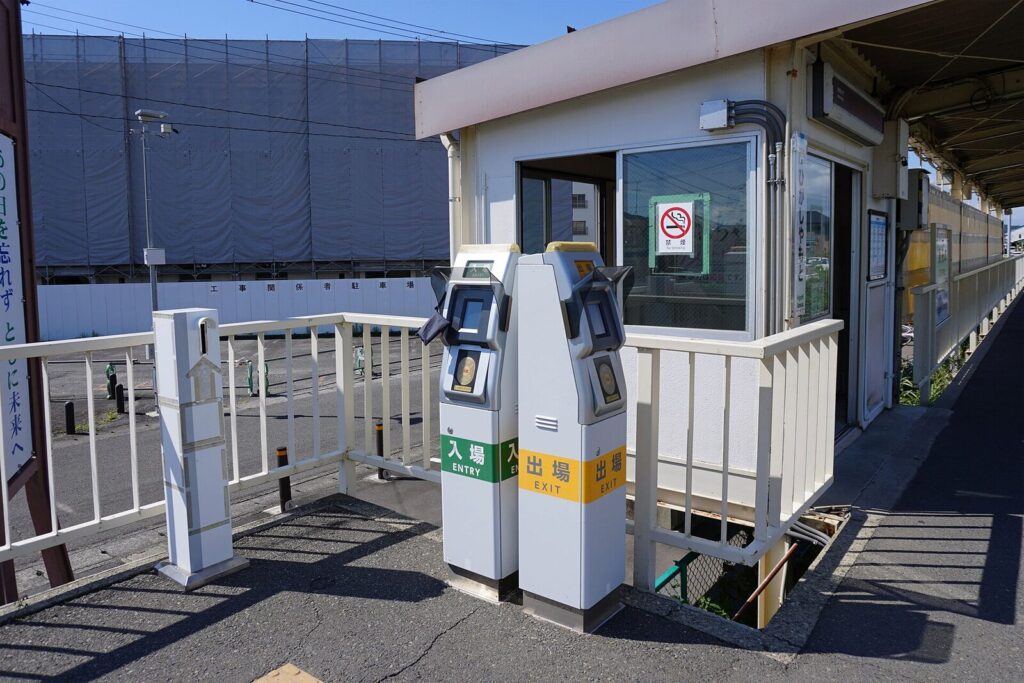
Apple's support page says that for riding transit, your device "doesn't need to be connected to a cellular or Wi-Fi network." Your first Suica in Wallet is set to Express Mode by default. That means you hold the Watch face near the gate reader and walk through. No unlocking, no app. You'll feel a gentle tap and hear a beep.
A few things are good to check before you go:
- Your Watch model. Apple lists Apple Watch Series 3 or later with the latest watchOS it supports. A Series 2 only works for Suica if it was bought in Japan.
- How you add it. On your iPhone, open the Watch app, go to Wallet & Apple Pay, and add a transit card. You need two-factor authentication on your Apple Account and an eligible payment card in Wallet.
- Your balance. On the Watch, open Wallet, tap the Suica card and scroll with the Digital Crown to see the balance.
JR East also has its own app for visitors, Welcome Suica Mobile. Its App Store page says you can "simply tap your iPhone or Apple Watch at the ticket gate," and that top-ups go through the credit card registered to Apple Pay. One App Store review sums up why people like it: "It was very easy to reload and check the balance, while the physical cards were not." Another just says: "Could not have been easier to use."
💸 How do I top up Suica on the Watch?
This is where you need a connection again.
On the Watch, open Wallet, tap your Suica, tap Add Money, and follow the screen. A top-up is a card payment, so the Watch has to be online — the easy way is to do it with your iPhone nearby and connected. Apple says you need a supported credit or prepaid card in Wallet to add money.
My tip: top up in the morning at the hotel, before you head out. Then the day's gate taps run offline and you never have to think about it.
🧳 What works where? Your Watch by connection
This table settles the question people actually have on day one: "What will my Watch do right now?"

The "known Wi-Fi" column means a normal password network, like an apartment rental or a pocket Wi-Fi router. "Hotel login Wi-Fi" means a network with a sign-in web page.
| What you want to do | iPhone nearby with data | Known Wi-Fi, iPhone away | Hotel login Wi-Fi, iPhone away | No iPhone, no Wi-Fi, no cellular |
|---|---|---|---|---|
| Suica at ticket gates | ✅ | ✅ | ✅ | ✅ |
| Apple Pay in shops | ✅ | ✅ | ✅ | ✅ |
| Top up Suica | ✅ | ✅ | ❌ | ❌ |
| Messages and notifications | ✅ | ✅ | ❌ | ❌ |
| Calls | ✅ | ✅ (Wi-Fi calling or FaceTime audio) | ❌ | ❌ |
| Maps directions | ✅ | ✅ | ❌ | ❌ |
| Stream music | ✅ | ✅ | ❌ | Downloaded music only |
| Workouts with GPS | ✅ | ✅ | ✅ | ✅ |
The hotel column is the part people miss. Apple's guide says the Watch "can't connect to public networks that require logins, subscriptions, or profiles," and it names hotels as an example. If your hotel Wi-Fi has a login page, sign in on the iPhone and keep the phone nearby. The Watch will work through it.
For normal password networks, the Watch supports both 2.4 GHz and 5 GHz Wi-Fi. You can join from Control Center on the Watch.
❓ FAQ
Can I buy an Apple Watch cellular plan from a Japanese carrier for my trip?
Apple lists au, NTT docomo, Rakuten and SoftBank for Watch cellular in Japan. But your iPhone and Watch must use the same carrier, so this only fits if your iPhone is also on that Japanese carrier.
Will Suica work if my iPhone battery dies?
Yes. The Watch holds its own Suica, and gate taps don't need a connection. Your Watch just needs battery of its own.
Can I have Suica on both my iPhone and my Watch?
You can have Suica cards on each device. Express Mode works one card at a time per device, so check which card is set to Express in the Watch app before you travel.
Do I need the Welcome Suica Mobile app if I already use Apple Wallet?
No. Both routes give you a Suica you can tap with the Watch. The app is made for visitors and its balance expires 180 days after issue, so pick it if you like having everything in one English app.
🎟 Your quick recap
- Watch cellular roaming depends on your home carrier. If they don't offer it, that's fine.
- Travel eSIMs can't go on the Watch. Put one on your iPhone and the Watch shares it.
- Suica on the Watch taps through gates with zero signal.
- Topping up needs a connection, so do it in the morning with your phone nearby.
- Before you fly, sort out one data plan for your iPhone — that one plan keeps both your phone and your Watch online for the whole trip.
Get your data sorted before you land

Ubigi — 10 GB / 30 days
- Data10 GB
- Valid30 days
- NetworkNTT docomo / KDDI / SoftBank · 5G
- HotspotYes

Airalo Moshi Moshi — 10 GB / 30 days
- Data10 GB
- Valid30 days
- NetworkSoftBank / KDDI (au) / Rakuten · 5G
Show sources
- Use Suica, PASMO, or ICOCA cards on iPhone or Apple Watch in Japan — Apple (accessed 2026-10-07)
- Use Suica, PASMO or ICOCA cards on iPhone or Apple Watch in Japan (top-up steps) — Apple (accessed 2026-10-07)
- Add a transit card to Apple Wallet in Japan — Apple (accessed 2026-10-07)
- Set up cellular on Apple Watch — Apple (accessed 2026-10-07)
- Apple Watch GPS + Cellular — Apple (accessed 2026-10-07)
- Apple Watch User Guide: Use Apple Watch without its paired iPhone — Apple (accessed 2026-10-07)
- Apple Watch User Guide: Connect Apple Watch to a Wi-Fi network — Apple (accessed 2026-10-07)
- Welcome Suica Mobile (App Store) — East Japan Railway Company / Apple App Store (accessed 2026-10-07)

Keep reading

Holafly vs Airalo vs Ubigi Japan eSIM: Price per GB Compared
Holafly vs Airalo vs Ubigi for Japan, compared at their published prices as of 2026-11: cost per GB at 3, 10 and…
Where to Charge Your Phone in Japan: Trains, Airports & Rentals
Where to charge your phone in Japan on a long day out: which bullet train seats have sockets, free airport charging, and…

Can I Bring a Power Bank to Japan? ANA & JAL Rules for 2026
Yes: up to two power banks of 160Wh or less, in your carry-on only. Here's what changed on ANA and JAL in…